How to Set a Default Environment for Anaconda and Jupyter
Learn how to set a default environment for your Anaconda and Jupyter workflows for a seamless and streamlined data science experience.
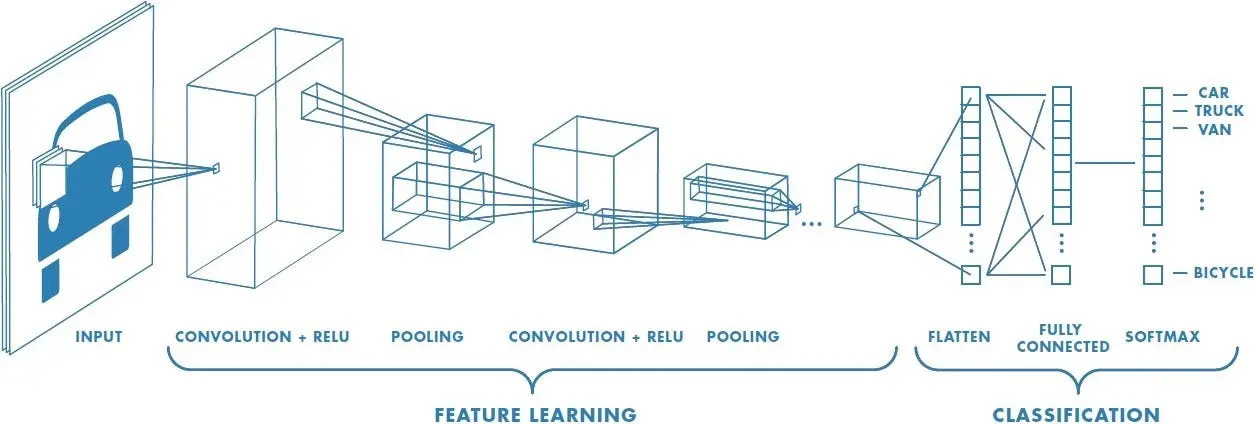
Artificial Intelligence has been witnessing monumental growth in bridging the gap between the capabilities of humans and machines. Researchers and enthusiasts alike, work on numerous aspects of the field to make amazing things happen. One of many such areas is the domain of Computer Vision.
Read article →Learn how to set a default environment for your Anaconda and Jupyter workflows for a seamless and streamlined data science experience.
Latest articles in Saturn Cloud Blog

As data scientists and software engineers, we often encounter technical challenges while working on complex models and vast datasets. …
Amazon Web Services (AWS) offers a wide range of tools for data scientists, and two of the most powerful are S3 and SageMaker. S3 is a …

Data Science is an ever-evolving field and Amazon Web Services (AWS) is at the forefront of this revolution, providing a suite of tools …

As a data scientist or software engineer, you may encounter a situation where you need to invoke a SageMaker endpoint from an AWS …

One of the key features of SageMaker is the ability to deploy machine learning models as endpoints, which can be invoked to make …
Amazon SageMaker is an end-to-end machine learning platform that simplifies the process of building, training, and deploying machine …

Amazon SageMaker is a fully managed service that provides developers and data scientists the ability to build, train, and deploy …